Experience Design

  • Subscribe to our RSS feed.
  • Twitter
  • StumbleUpon
  • Reddit
  • Facebook
  • Digg

Saturday, 26 March 2011

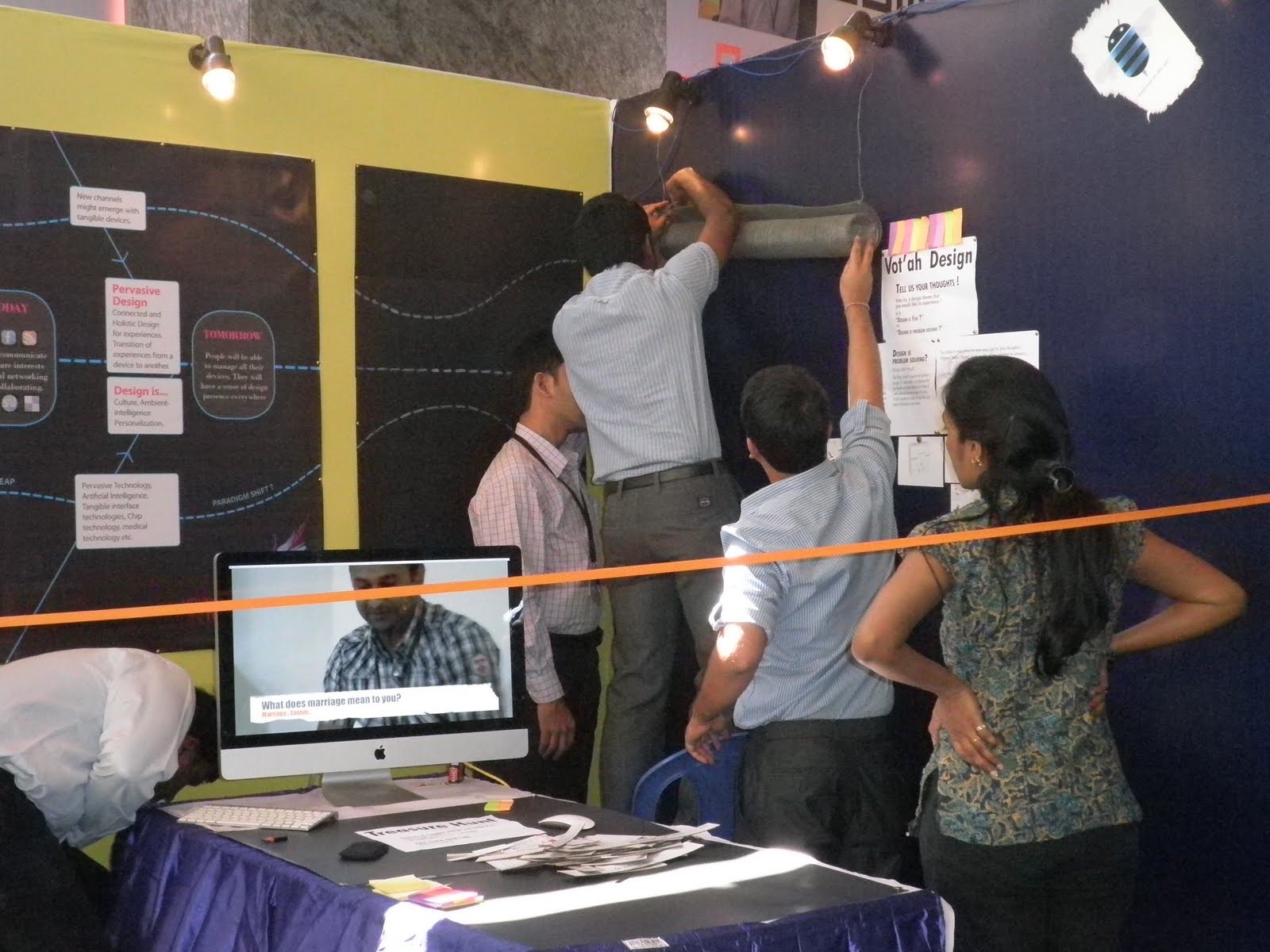
MindTree UX Osmosis '11 Photos

Posted on 11:54 by Unknown


Read More
Posted in Osmosis, photos | No comments

Tuesday, 15 February 2011

adiVERSE virtual footwear wall

Posted on 20:07 by Unknown
The future of retail lies in bringing together the worlds of digital and retail to offer extraordinary in-store customer experiences. Unveiled at the 2011 National Retail Federation Expo in New York, this interactive, real-time rendered product installation for adidas demonstrates UK brand agency Start JudgeGill’s belief in “connected retail.” The experience brings shoppers the products they want, even if they’re not currently available in a store, and gives adidas the opportunity to offer its largest range of products in even its smallest stores. Behind the scenes, the system is currently gender and age-aware and presents relevant products faster; adidas will eventually enhance the shopping experience by placing products in the context of the sport for which they’re designed. Once the success of the adiVERSE system for footwear is tested and demonstrated, there are plans to expand to apparel and accessories, in stores worldwide.


While this is a cool in store experience design concept. I am still wondering that this concept is very similar to web experience of http://www.nikeid.nike.com/.

In store experiences are all about touch and feel and in store social interactions. Customers walk in to Adidas store with bunch of friends and they spend time comparing assortment based on style, color, pattern, texture, price etc. Customers often see stuff online and make purchases in a nearby store. It is good that customers will be able to see all products even when they aren’t available. But can be a bad experience if they like something and not able buy instantly (specially for impulsive buyers)

I believe such digital displays can be a good idea for mobile stores where stores have dummy phones on display.

This installation works well when customer service reps are busy and there’s no one to explain the details. However, most customers typically wear the shoes, walk around a bit to check if it the right one. Maybe, they can use a combination of haptics and Kinect’s technology to give a real feel of the shoe.

Why a person need another interface such as iPad to check out the shoe?

Well, there can be various reasons to do so. One of them can be: In major metros the rental spaces are going sky high, the display is limited and in western countries even the labour is expensive. In such cases, you cannot have all the shoe models out on display in a mall commercial store. So, it is better to give alternative mediums to customers for checking out the collection. One such medium is Ipad, Iphone, or big touch screens as shown in the video.

But then why don’t we integrate later part (iPad) with the initial one (wall)? Suddenly, there is change of experience and person has to wait on the shop keepers to receive the iPad.

Possibly becuase when the person on the video said “now you can checkout” I was thinking OMG checkout on that screen …where world can see all the personal information !!!.

So having the checkout done on a smaller personal display is a clever way to maintain individual’s privacy. I am curious however to understand how they can transition the session from wall to a device like iPad, that is probably beginning of new era in transitioning from one device to another without breaking the flow.

Imagine you are working in office and you are half way through filling your appraisal online…., then you walk to train station and complete the remaining form filling on the phone (same session)…. Later submit it from home computer in the (same session). It is a good a way, to keep the our transactions secured.

Then the other question would be, why the checkout is not happening at the checkout counter?

Well, if we have same session then will it not affect the security, I would imagine that someone could get to the sensitive information. Well, that’s a valid point, But, for us to understand it, let’s go through a small exercise.

Suppose you walk into a shoe store. There is a security guard at the entrance. You go to the display counter and look through the range of shoes on display. When you like a couple of them, you ask the salesman to get the sizes for those particular shoes. You will even like to try out those shoes. Then you zero down on one of the choices, and move towards the payment counter. There the cashier bills you accordingly and you walk out of the store. The security may again check your bills and match it with the purchased items.

Now, we see that there are at least 3 people involved in the whole transaction for one customer. Many stores go away with the security guard. The store that we saw in the video has gone a step ahead and removed the cashier and salesman as well. In effect we have highly reduced the manual intervention, which is highly desirable in high labour cost economies or businesses where ratio of labour cost to purchase cost is high.

I agree upon the point that it would reduce the manual interventions. Here store keeper approaches the customer with an iPad. It do not seem to be a practical to me, to keep a person ready to take iPad to customer.

As discussed before, the experience at the store is to have social interaction through touch and feel.

Being to show rooms of cell phones, I look up those cell phones and I hardly read any information that is printed next to the phone. Instead, I ask the sales representative about the product. And make him compare on the different products that I am interested in. And, I know I might be able to get the relevant information from any other web source. At store, I am getting the experience of interacting with other person, who can somewhat able to relate to me.

I think a retail store is about the personal connection, real experience (look, touch and feel) and also to help buyer make their right decision. For instance – Some time back one of my friends wanted to buy a sports watch (Having features of Altimeter, Barometer, Thermometer, Tide Graph, Heart Beat etc.). He was getting a discount price online but not in the store. So he short-listed some models browsing the online product list, specifications and prices. He also read the reviews of those watches but was not able to finalize the model that he should go for. He was skeptical as the watch was pretty costly and the virtual image differed from the real one (look, touch and feel). Finally he visited the store (Bangalore Central Mall), had a real experience (by trying out, comfort, product aesthetics when he is wearing it, etc.), and talked to the sales representative and zeroed down the final one. After that he confidently placed an order online.

Focus here (Adidas) is to guide and motivate people to purchase by leveraging information of 8,000 pair of shoes (without having to be a flagship store), technical specifications, related videos and user feedback. But the real product display and sales man shouldn’t be replaced with the touch screen. (The salesman helps buyer to try out different shoes, Buyer decides the final one based on the comfort and similar other parameters) Therefore I think creating a virtual experience in a physical store will only help in getting information about the products in a smart way but cannot succeed in the real experience of buying the product by physically going to the store. If that was possible then the consumer need not go to the store and can buy the stuff online itself from home.

Success of a business depends on the end user’s satisfaction after using the product. One of the criterias to satisfy user is to ensure user to use the appropriate and right product for him. Physical store helps and guides user to do this in an effective and simpler way.

- Post is sumamry of email discussion on virtual footwear wall concept. Thanks to all discussion participants - Vallabh, Baizil, Ankush, Jana, Chinmoy and Veena.
Read More
Posted in Customer Experience, engaging experience, User Experience Design | No comments

Friday, 11 February 2011

Donation box design at TATE Modern

Posted on 07:58 by Unknown

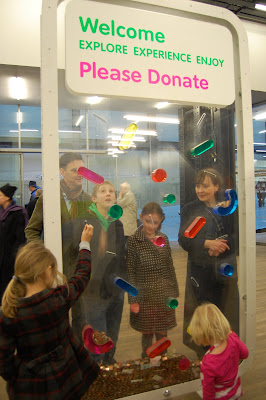
TATE Modern in London operates completely on the support of its visitors (over 8 million per year), trusts, foundations, and corporations. Therefore, it is important for the TATE to generate enough interest in people to make donations and keep the functions of the museum going.


Donation is an act of willingness and care. Most donation boxes remain empty as people don’t feel motivated enough to participate in the donation process. Designers of TATE donation box have made efforts to understand the motivational aspect of such donation activity. They have designed the box to enhance the whole experience of donating a few pence with a sense of play and achievement.

The donation box has been designed in such a way that when donors drop coin into the box, it doesn't reach the bottom immediately. Rather it stumbles down from one obstacle to another placed on its way down the bottom. People (especially kids) make multiple attempts to make sure that it takes long for the coin to finally settle at the bottom of the box. This experience is quite opposite to the one that we get while playing Tilt Maze Game where the objective is to bring the metal ball in the center of the maze as quickly as possible.

TATE offers a range of attractions for all kinds of people (tourists, art enthusiasts, artists, and designers), including kids accompanied by their parents, who come to explore and witness the various art lead happenings in the museum. While kids are not real donors, they happen to be the biggest participants in the donation process at TATE. Children accompanied by adults (mostly parents) get fascinated with whole process of donation as a playful activity without really understanding the reason of it. TATE exemplifies in best of ways how experiences that are designed keeping people's context, activities, and motivations in mind are far more effective than other initiatives.
Read More
Posted in London, TATE, User Experience Design | No comments

Thursday, 18 November 2010

Experience Sense of Touch Through Haptics

Posted on 07:49 by Unknown
Human Computer Interaction (HCI) is considered to be the intersection of computer science, cognitive science, design and several other fields of study, and is a multidisciplinary field centered on people’s interactions with computers in various respects. Practitioners and researchers endeavor to understand people’s behaviors and actions in order to make computers more usable and receptive to people’s needs. People interact with machines using their physical senses including sight, hearing, taste, smell and touch. Wikipedia notes, “Senses are the physiological capacities within organisms that provide inputs for perception” [1]

The importance of touch in HCI
One way of interacting with a device is by using the sense of touch. “The touching is not limited to feeling, but it allows interactivity in real-time with virtual objects” [1]. In HCI, Haptics is a field that allows people to interact with computers. A haptic device gives people a sense of touch with computer generated environments, so when virtual objects are touched, they seem real and tangible [2]. Haptic devices are capable of measuring bulk or reactive forces that are applied by the user; it should not be confused with touch or tactile sensors that measure the pressure or force exerted by the user to the interface.

“Haptic technology, or haptics, can be defined as feedback technology that takes advantage of a user's sense of touch by applying forces, vibrations, and/or motions to the user” [1]. Haptics are implemented through different types of interactions. These interactions can be categorized into the different types of touch sensations a user can receive—force feedback, tactile feedback, and proprioception (or kinesthesia) [3]. For instance, you can change a conventional mouse into a haptic mouse by adding force feedback capability, or, in other words, a haptic mouse reacts to responses for users to make a decision.


Examples of where it is used and who benefits from haptic device
In recent years we have seen how the sense of touch has become an integral part of how we experience things, both physically and emotionally [2]. Haptic devices can be used in different applications including computers, video games, mobile consumer technologies, research, medicine, and robotics.

Most of us are familiar in using touch screen technology on cell phones; a person can interact with electronic visual display using the sense of touch. It is said to be a haptic touch screen when it provides users with true tactile feedback that supports a multitude of touch and gesture effects [4].

Haptic devices provide greater potential for people who are visually challenged. Haptic technology can assist a blind person in making right decisions while interacting with technology using the feedback provided to them. A recent study conducted at “VI Fit” [5] provides evidence for how a haptic device can benefit blind users.


Product Designers can benefit from free form modeling on products. Three-dimensional detailed shapes can be formed for manufacturing if input devices that give touch feedback relating to the "surface" they are modeling allowing faster and more natural workflow than with traditional methods [5]. These technologies could help designers creating video games with rich rendered Three-Dimensional environments that can be hard to navigate on a two-dimensional screen.

An experienced designer can create interfaces through which the end user can feel the product before purchasing the product. Designers can provide a greater experience for end user allowing them to feel the product with their own hands, for example, when an end user wants to buy a luxury watch such as Breguet. Haptics is an emerging field in HCI and many researchers around the globe are working on providing a physical experience for virtual objects.

Thanks to Vinay Dixit for reviewing

References:
[1] http://en.wikipedia.org/wiki/Haptic_technology
[2] http://home.novint.com/novint/whatis3dtouch.php
[3] http://electronics.howstuffworks.com/gadgets/other-gadgets/haptic-technology2.htm
[4] http://www.pacinian.com/applications
[5] http://www.sensable.com/products-freeform-systems.htm
Read More
Posted in Experience Touch, Game Design, Haptics, Visually Challenged | No comments

Tuesday, 16 November 2010

Using Patterns Around Us as Inspiration

Posted on 21:50 by Unknown
Last Design Friday, we had a session on using 'Patterns' we see around us as an 'Inspirational' source book into our design, mainly to help define UI Patterns.

The objective was to use these patterns (from our surroundings) to solve some of the design problems in the UI.

Below are few pictures from that session:
Collage of patterns folks captured from their surroundings -


Participants in the workshop -


Presentation by attendees...


Read More
Posted in design fridays, inspiration for design, ui patterns | No comments

Tuesday, 9 November 2010

Rapid prototyping for tangible user interface designs

Posted on 08:55 by Unknown
As designers we apply participatory approaches of engaging users and stakeholder in the design process for better design outcomes. Using white board, affinitive mapping, brainstorming, wire-framing, prototyping etc. in order to arrive at functional specifications are common practices required in product development. These activities not only serve the purpose of design but also to communicate ideas and concepts to various stakeholders.


The idea is to understand if conventional design techniques would stand complexities around designing Tangible User Interfaces (TUI). Let’s explore in detail. TUI is a user interface, where a user interacts with digital information through physical representation.  Designing for TUI brings various challenges to designers primarily due to physical representation of digital information and variety of complex interactions available. Watch this video for a better understanding. 


For designing a TUI system, a designer needs to consider physical objects, physical actions, interactions and physical environment because everything is an interface that interacts. More than just complexities around TUI itself, there are challenges with respect to effective communication of design concepts to stakeholders for their buy in. This leads to a few questions to our use of conventional design approach. How effective our conventional design approached would be for TUI designs?  Should we adapt to rapid prototyping technique? Would rapid prototyping help designers conceptualize and communicate ideas better.


Consider a brainstorming session; we bring a mix of designers, developers, implementers, managers, stakeholders and users. Brainstorming brings ideas to the table in order to solve a design problem.  During such sessions, the effectiveness of communication is maintained by making use of whiteboards, post-its, paper and pen. Mostly the systems we design are for two-dimensional space. But when it comes to design for three-dimensional spaces, we should be using three-dimensional objects. We know it is important for people to express their views and have effective communication to develop innovative ideas. Rapid prototyping with three-dimensional object would be major drive to bring people into action.


In designing for TUI, it seems important for designers to use three-dimensional objects for prototyping. By introducing such dimensions communication and engagement of groups can be increased. This could help designers to visualize the space that they are designing for. And in addition, designers can investigate on affordance and metaphors used of the group to formulate the thought process. This approach can produce positive outputs during discovering phase of a product development lifecycle and to frame them during definition phase.

Special Thanks to
Vinay for editorial hands
Tangible Bits for sharing the video
Read More
Posted in Rapid Prototyping, Tangible User Interface, TUI | No comments

Monday, 18 October 2010

Is Crowdsourcing firing Designers?

Posted on 02:45 by Unknown
Recently when customers rejected the new redesigned GAP logo, GAP decided to crowdsource the redesign exercise to help define their brand.
The entire GAP redesign exercise emphasized that if designers do not do their job well and management do not make wise decisions, the customers reject it (after all the customer is the king). And they will also suggest a redesign of the brand for you!


There may be many reasons why the design exercise could have gone wrong - like management making all the design decisions or underestimating design or their customers (thinking they would blindly accept their chosen logo). The management have realized that their decisions are not final, even when it comes to logo redesign. And the outpouring on the social media on this topic suggests customers do care for products they have been buying over the years.

As the blame is now on the design firm who came up with this logo and GAP having decided to crowdsource instead, how do the rest of us (designers) ensure we do not fall into such situations? And how do we ensure crowdsourcing does not fire us and instead we work hand in hand. Moreover, what will our role be henceforth?

If you look back, from the time digital media entered the lives of designers (in 90's), designers needed to had these basic skills:
  • Idea generator, Creative, at times think out of the box
  • Understands problems, users and provides appropriate solutions
  • Produce aesthetically pleasing designs – have good knowledge in color theory, typography, layout, etc.
  • Apply usability/ ergonomic principles
  • Be proficient in all design softwares (esp. Adobe products)
  • Work with team

With the explosion of the internet since late 90s, where anyone can access basic tutorials on Graphic design and opensource tools like GIMP, consumers are now taking a shot in designing, just like photography. And companies are trying to capitalize on this through ‘crowdsourcing’, just like what GAP is doing now, as it turns out much cheaper than hiring a design firm! Added to this, the design is created directly by the end user and their needs are being stated through design.

An amateur designer can have all the points mentioned earlier to a certain extent. S/he may be creative, have ideas, execute solutions in an amateur manner using the design tools. There will be more tools in future which will auto-suggest color combination, layout (just like what templates have already begin to do now)

However, crowdsourcing will also generate enormous individualistic data and management will still need to pick the right design which will reflect everyone's perception of the brand or idea. This is where we designers can capitalize.

Our roles in future will mainly be to –

Engage users
We will need to draw ideas from everyone, while allowing everyone to express themselves, which in turn makes customers feel they are being engaged in the entire exercise. We collect their inputs (data) for our design process and to further validate our design to the client with the populist data. We can also revalidate our design again through crowdsourcing and when the design is finally out in the market, the users will be proud of the outcome!

Analyze and draw insights
We will need to use crowdsourcing for design research to get insights to our design. The data collected from users through crowdsourcing (eg: pictures of their daily routine, etc.) will ultimately help create better products.

Induce design thinking
A designer will need to induce design thinking in the organization or team, and drive the design exercise, with team members, stakeholders and customers, getting their hands dirty in design implementation. A designer’s role will be to facilitate and bring out the best ideas from everyone and manage the entire design exercise! And use ‘Crowdsourcing’ as one of the methods from user research to design implementation.

And how do we designers achieve this - We will however need to focus more on design strategy and behavioral aspects. The technical aspects like layout, typography, usability heuristics will be automated in future. We will need to think cross-disciplinary rather than specialize in individual fields like graphic, fashion or industrial design in future.

The client/ management will also need to understand the importance of design, branding and be more involved in the design exercise while giving powers to the designer to make strategic decisions.

Thanks to Vinay and Anshuman for their inputs on the role of a designer in future.

Read More
Posted in crowdsourcing, design, User Experience Design | No comments
Newer Posts Older Posts Home
Subscribe to: Posts (Atom)

Popular Posts

  • Is ‘Responsive Design’ Enough? Don’t Forget the ‘Context’
    The number of consumers using smartphones and tablets to access websites, brands are increasing. This had led to reconsidering how to design...
  • “Tizen” Knocking the door… Do we really need another Mobile Operating System?
    R eports have confirmed that “ Samsung ”will be using “ Tizen OS ” for its new upcoming high-end smart phones. Well the smartphone domain is...
  • Mobile Barcodes, The Next Generation mode of marketing
    Is there a segment of the communications market more exciting and more rapidly evolving than the mobile space? Hardly. While it wasn’t the f...
  • Can Gamification help achieve better adoption?
    You can lead a horse to water but you can’t make him drink. This proverb holds a lot of meaning in almost everything we do in our life, espe...
  • The not-so-smart market shares of smart phones
    We shouldn't be surprised if the latest IDC figures make Andy Rubin do it the Gangnam style. Android notched up 75% of the smartphone m...
  • Sarit Arora talks about Emerging UX Trends & Practices at 'd+b Talks'
    Few days ago, Sarit Arora from Yahoo! visited our campus to give a talk on 'Emerging Interaction design trends and User Research for Inn...
  • This week at d+b talks
    This week at d+b talks, Sarit Arora from Yahoo talks on 'Emerging Interaction Design Practices' and 'User Research for Innovatio...
  • Championing the LUV of Design
    This has been contributed by Swarupa Manjunatha, an employee of MindTree. Netdiver Digital Culture Magazine. Yup! That’s it. A one stop shop...
  • Accessibility Testing: Underutilized Today
    Making sure that your website or application is accessible to all types of users (like the vision, hearing, cognitive, literacy, and the phy...
  • What Game Designers Do That Interface Designer Don’t
    At many occasions stakeholders ask designers to design experiences that are simple yet immersive and engaging for commercial Web application...

Categories

  • Accessibility
  • Accessible Software
  • aesthetic
  • airport
  • assitive technology
  • augmented reality
  • bangalore
  • brainstorming
  • cellphone
  • collaboration
  • Commenting
  • conference
  • content
  • content design
  • context driven design
  • crowdsourcing
  • Customer Experience
  • d+b Talks
  • dawakhana
  • delhi
  • design
  • design for mobile
  • design fridays
  • design mela
  • Design should be Fun
  • design thinking
  • digital experience
  • disable
  • drawing
  • e-reader
  • elements of signage
  • engaging experience
  • Experience Touch
  • Game Design
  • GIDS
  • Graphic Design
  • Graphics
  • guidelines
  • Haptics
  • HTML5
  • Icons
  • ideation
  • India
  • Indian Railways
  • Information Architecture
  • innovation
  • inspiration for design
  • interaction design
  • interaction pattern
  • Introduction
  • iOS
  • ipad
  • ipad 2 usages
  • iterative design
  • laptop
  • Latest Trends
  • leaptop
  • London
  • long term memory
  • LTM
  • megids
  • mela
  • microsoft
  • MindTree
  • mobile
  • mobile context
  • mobile experience
  • online experience
  • opnions
  • Osmosis
  • pattern
  • PC
  • Persona
  • personal computers
  • personas
  • photo storage
  • photos
  • physically challenged
  • Pictogram
  • Pret
  • problem
  • product design
  • QR Codes
  • Rapid Prototyping
  • Reference
  • Reservation Engines
  • Responsive design
  • Salary Survey
  • Search Engine
  • service design
  • session
  • short term memory
  • sign
  • signage
  • sizing the content
  • sketching
  • smartphone
  • Social Networks
  • solution
  • solutioning exercise
  • spastic society of karnataka
  • splash screen design
  • STM
  • street sign
  • tablet
  • tag
  • Tangible User Interface
  • TATE
  • Text input
  • thoughts
  • touchscreens
  • traffic sign
  • translation
  • travel
  • tree based navigation
  • TUI
  • ui patterns
  • url
  • usability
  • Usability Analysis
  • User Experience
  • User Experience Design
  • UX and agile
  • UX design and salsa
  • UX design principles
  • UX planning
  • Video
  • viewport
  • Visually Challenged
  • web experience
  • welcome screen
  • yahoo
  • YouTube

Blog Archive

  • ▼  2013 (2)
    • ▼  July (1)
      • Is ‘Responsive Design’ Enough? Don’t Forget the ‘C...
    • ►  March (1)
  • ►  2012 (5)
    • ►  November (1)
    • ►  June (1)
    • ►  May (3)
  • ►  2011 (23)
    • ►  November (1)
    • ►  September (2)
    • ►  August (1)
    • ►  July (5)
    • ►  June (3)
    • ►  May (4)
    • ►  April (3)
    • ►  March (2)
    • ►  February (2)
  • ►  2010 (13)
    • ►  November (3)
    • ►  October (3)
    • ►  September (1)
    • ►  August (3)
    • ►  July (1)
    • ►  June (1)
    • ►  May (1)
  • ►  2009 (13)
    • ►  October (1)
    • ►  August (1)
    • ►  June (2)
    • ►  May (1)
    • ►  April (1)
    • ►  March (1)
    • ►  February (1)
    • ►  January (5)
  • ►  2008 (24)
    • ►  December (3)
    • ►  November (5)
    • ►  October (3)
    • ►  September (3)
    • ►  August (2)
    • ►  July (5)
    • ►  June (3)
  • ►  2007 (1)
    • ►  May (1)
  • ►  2003 (1)
    • ►  May (1)
  • ►  2002 (1)
    • ►  September (1)
Powered by Blogger.

About Me

Unknown
View my complete profile